Individual Work
TODO: Animation 1 Lab
Complete the following Animation 1 lab followed by the Playblasts lab.
Deliverables
SUBMIT: Spline Tracer Maya File
The spline_tracer
.mafile of the completed assignment renamed assection_hw8_firstname_lastname.ma
SUBMIT: Playblast
The
.movfile of the completed assignment renamed assection_hw8_firstname_lastname.mov
Rubric
| Item | Points |
|---|---|
| Fully completed assignment | 2.5 |
| spline_tracer: Replicated curve in Graph Editor | 2 |
| playblast: Submitted playblast | 4 |
| playblast: More than three bounces | 0.5 |
| playblast: Squash and stretch | 0.5 |
| playblast: Rotation of the ball | 0.5 |
| Total | 10 |
Group Work
Project Managers: For group work this week, you will create a blocking animation for your short. You will be dividing shots amongst your team for each member to animate.
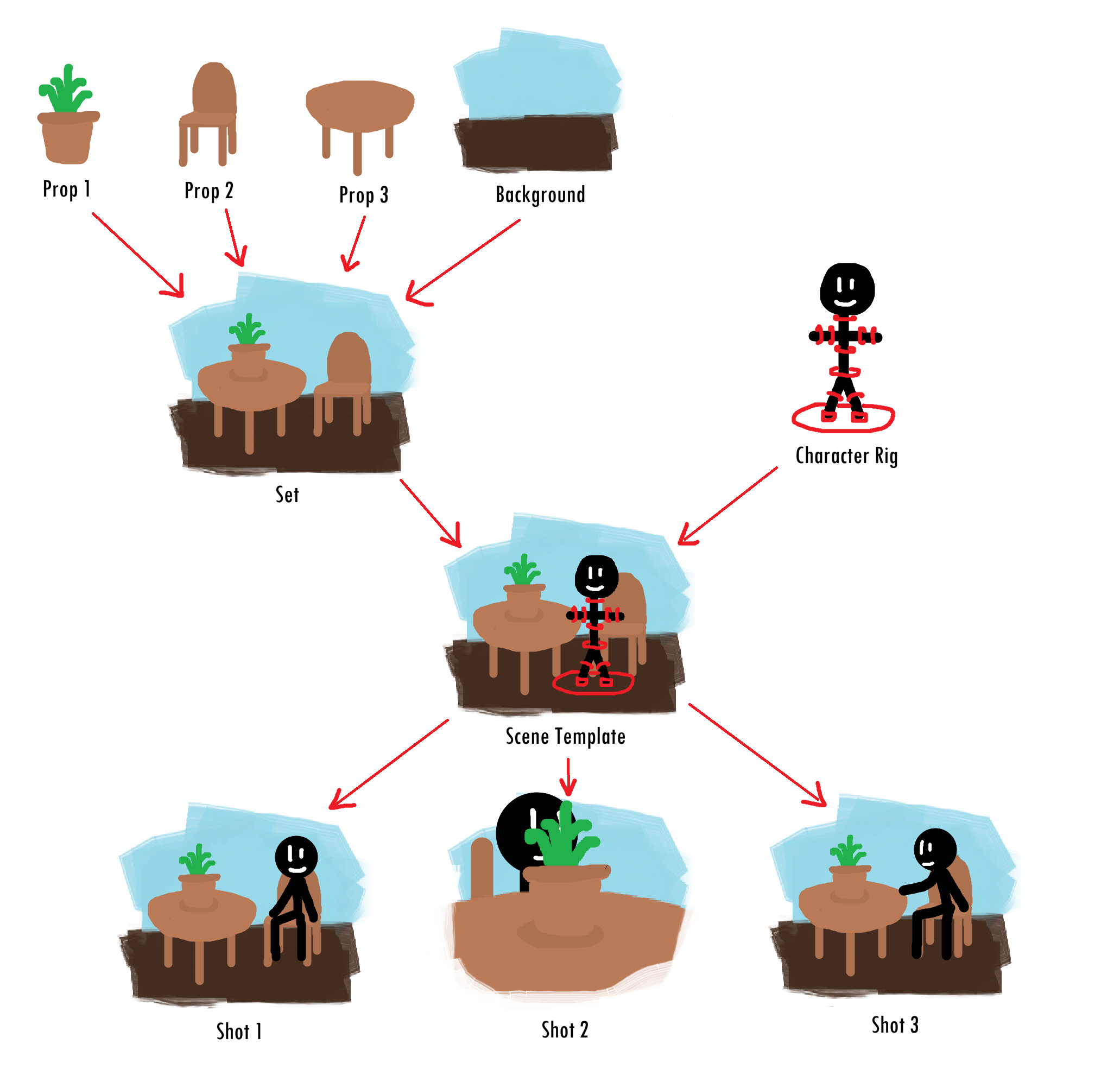
Recall that the best practice for splitting up animation is to break it down into scenes first, then break down each scene into camera shots. Make sure to correctly set up each shot in its own file by referencing the set / background and referencing the character rigs. A good format to follow is to create a scene template that can be referenced in every shot of that scene. Here’s a diagram showcasing an example of this:
DO NOT KEY THE MASTER CONTROLLER
Never keyframe the master controller! Recall that the master controller is the highest controller in the hierarchy. The purpose of the master controller is to allow you to move the whole animation in case something needs to be adjusted. Movement should be done using other controllers, such as the Center of Gravity (CoG) controller.
TODO: Blocking Animation
Create your blocking animation! Each shot should have its own file with the set and character rigs referenced in appropriately.
Remember that blocking animation is for mapping out basic movements that can later be refined as you continue animating. You shouldn’t spend too long animating each shot for blocking!
Once you’ve blocked a shot, create a playblast for it. You’ll combine all the playblasts for each shots into your final blocking animation video.
Deliverables
SUBMIT: Team Progress Report
Complete the Weekly Group Progress #6 assignment on Gradescope as well as the relevant writeup. This should include a short description of what you did for the week, what your group’s overall progress is, as well as a screenshot of your slide deck of images detailing your work.
SUBMIT: Midterm
Complete the Midterm assignment on Gradescope. You will need to submit the following materials:
- Screenshots of all shaded assets in your sets, these must be rendered
- Screenshots of all modeled characters shaded
- Screenshots of all characters fully rigged (controllers, rigs, and binded)
- A completed blocking animation of your short
Additionally, you will need to do a write-up of 4-5 sentences and provide feedback about your group and its facilitators.